Movavi
AI-powered video editing with trimming, color grading, subtitles..
What is Movavi?
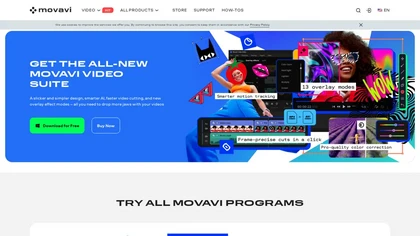
Movavi Video Editor is a desktop editing application that lets users trim, crop, and color‑grade footage with a user‑friendly interface.It offers AI‑powered tools such as automated subtitles, background noise suppression, and motion tracking to streamline post‑production tasks.
The program supports over 180 video and audio formats and allows the addition of transitions, titles, overlays, and a library of filters and LUTs.An integrated screen‑recorder captures full‑screen or custom areas and webcam feeds for tutorials and presentations.
Movavi on the web: Movavi on FacebookMovavi on LinkedInMovavi on YouTubeMovavi on Instagram
Movavi details
- Built for
- Individuals
- Stated compliance
- GDPR
Compliance as stated in Movavi's own published documentation.
Movavi tech specs
- Payment Processors
- 2Checkout
Movavi pricingPaid
Movavi user reviews
Based on 4 reviews, 75% of users recommend Movavi, rated highly for value for money.
Liked for
Disliked for
Movavi playbooks
Movavi's key features
- ✓Fast multi-format video conversion
- ✓AI upscaling up to 8x
- ✓One-click auto subtitles
- ✓AI photo retouching tools
- ✓6,000+ creative effects library
- ✓Custom area screen recording
- ✓Timeline editing with AI tools
Movavi use cases
- ⚡Trim a travel vlog, apply color grading presets, auto-generate subtitles, and suppress background noise for a polished, cinematic finish
- ⚡Record a software tutorial with the built-in screen recorder, use motion tracking to highlight interface elements, and auto-add captions for clear, accessible learning
- ⚡Create a short promotional video, add dynamic titles and overlays, enhance audio with noise suppression, and fine-tune colors for a professional look
Who is Movavi for?
- Video editors
- Content creators
- Product designers
- E-commerce sellers
- Digital marketers
Movavi FAQ
How much does Movavi cost?
Movavi is a paid product with no free plan. Plans include Movavi unlimited at €125,95 and Movavi unlimited business at €190,69.
Is Movavi safe to use?
Movavi states GDPR compliance in its own published documentation. It has a substantial audience that is independently measured month to month.
What are the best alternatives to Movavi?
The closest alternatives to Movavi are Video Editor AI, VEED, Wondershare Filmora, AI Video Cut and Videoleap. You can compare them side by side in the alternatives section further down this page.
What does Movavi do with my data?
Its privacy policy states that personal data is sold or shared for marketing purposes. Data may be shared with third-party service providers that help run the product.
Does Movavi auto-renew or offer refunds?
Movavi subscriptions renew automatically until you cancel. It states a 14-day refund window.
Similar to Movavi
 Flow - GoogleCreate and edit cinematic clips with text prompts.
 Topaz Video AICompliance as stated in Topaz Video AI's own published documentation.
 CapCutVideo editing and design with AI-powered features.