Wann AI
AI-powered text-to-video and image generation for social media content.
What is Wann AI?
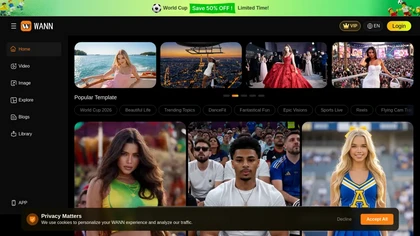
Wann AI is an AI video and image generator for text-to-video, text-to-image, image-to-video and reference-video workflows.It supports multiple models (Wann 4.0, Seedance, Grok, VEO, Nano Banana and others) and offers selectable model presets for different visual styles.
Output options include fast, HD and Ultra HD quality with resolutions up to 1K, 2K and 4K and common aspect ratios.Duration controls and frame export support short-form clips (5s, 10s, 15s) and multi-output batches (1–5 outputs).
Built-in templates cover media, fashion, sports, dance and social reels, plus tools for motion control, background removal, clothes changes and video extension.Mobile apps for Android and iOS and multi-language support enable on-the-go content creation for creators, marketers, social media managers and designers.
Wann AI on the web: Wann AI on DiscordWann AI on the App Store
Wann AI details
- Company
- SG DIGITALMOBI PTE. LTD.
- Jurisdiction
- Singapore
Wann AI tech specs
- Works with
- Google / Veo Google / Nano Banana Qwen Kling ByteDance / Seedance
Wann AI pricingFreemium
Wann AI user reviews
Based on 2 reviews, 100% of users recommend Wann AI, rated highly for ease of use.
Liked for
Wann AI playbooks
Wann AI's key features
- ✓Text-to-video, text-to-image, image-to-video and reference-video workflows
- ✓Supports multiple models with selectable model presets (Wann 4.0, Seedance, Grok, VEO, Nano Banana)
- ✓Output quality presets (Fast, HD, Ultra HD), resolutions up to 1K/2K/4K and common aspect ratios (16:9, 9:16, 1:1, 4:3, 21:9)
- ✓Duration controls and frame export with short-form clip lengths and multi-output batching (1–5 outputs)
- ✓Built-in templates and editing tools including motion control, background removal, clothes changes and video extension
Wann AI use cases
- ⚡Create attention-grabbing social media reels and short-form videos using Wann AI's social reels templates and presets, choose aspect ratios and durations, remove or replace backgrounds, control motion and clothing, and export in 4K directly from the mobile app without any filming or coding
- ⚡Produce high-quality product imagery and 4K promotional videos from simple text prompts or existing photos with Wann AI's text-to-image and image-to-video workflows, leverage multiple models and motion/background controls and e-commerce-friendly templates to generate polished assets ready for stores and ads
- ⚡Turn storyboards or concept art into cinematic text-to-video scenes and animated clips using Wann AI's templates, aspect ratio presets and precise motion/background controls, export short-form or longer 4K videos for marketing, pitches or social campaigns and refine them on mobile
Who is Wann AI for?
- Content creators
- Graphic designers
- Videographers
- Marketers
- E-commerce sellers
Wann AI FAQ
Is Wann AI free?
Partly. Wann AI has a free plan with usage limits, and paid plans unlock the full feature set.
Is Wann AI safe to use?
Wann AI is operated by SG DIGITALMOBI PTE. LTD., registered in Singapore. It has a substantial audience that is independently measured month to month.
What are the best alternatives to Wann AI?
The closest alternatives to Wann AI are Veo3, Video Generator - A2E.ai , Clipfly AI Video Generator, AIReel and Flow AI Video. You can compare them side by side in the alternatives section further down this page.
Is there a mobile app for Wann AI?
Yes. Wann AI has a mobile app alongside its web version.
Who made Wann AI?
Wann AI is built and operated by SG DIGITALMOBI PTE. LTD., a company registered in Singapore.
Which AI models does Wann AI use?
Wann AI is built on Google / Veo, Google / Nano Banana, Qwen, Kling and ByteDance / Seedance. Which models you can reach may depend on your plan.
Similar to Wann AI
 Veo3Generate high-quality, realistic 4K videos using AI.
 Clipfly AI Video GeneratorAutomate video creation with AI-powered text-to-video functionality.
 Hotellobby AIAI-generated 15s duet rap videos from two uploaded photos.